
How-to test · one run each
Why Ollama is slow on a Mac: context length, measured
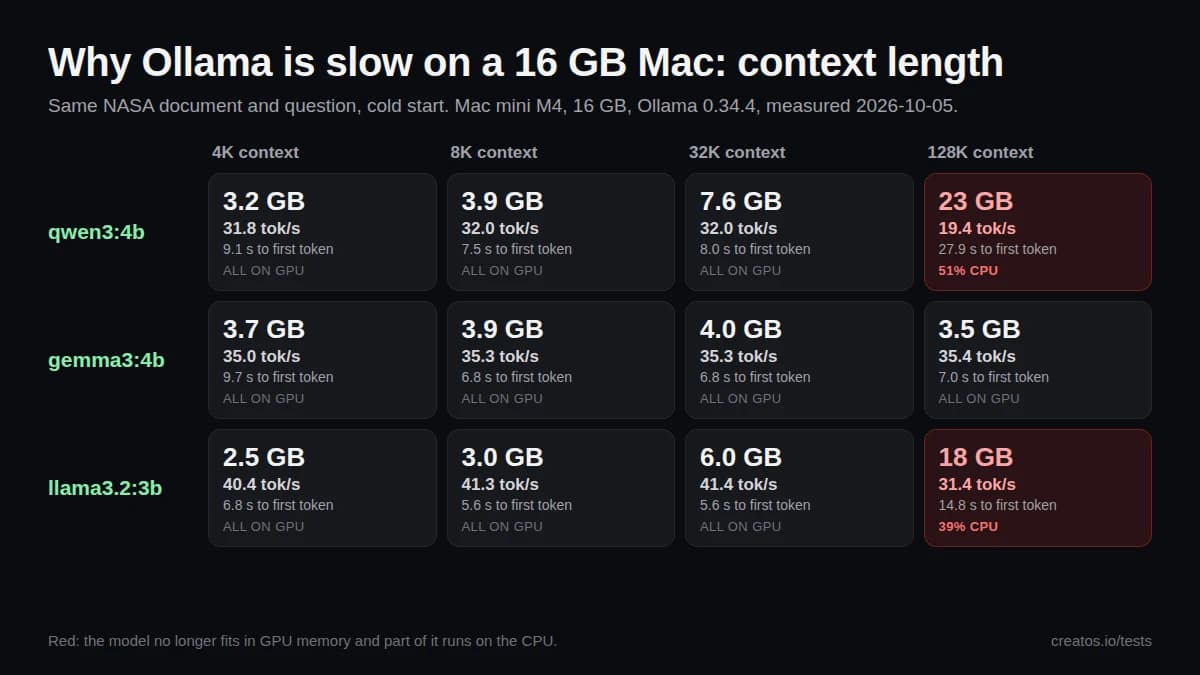
On a 16 GB M4 Mac mini, a 128K context length pushed Qwen 3 4B and Llama 3.2 3B partly onto the CPU: up to 39% slower and up to 3.7x longer to the first token.
- Tested
- Updated
TL;DR
- At 128K, qwen3:4b needed 23 GB, more than the 16 GB Mac has, so 51% of it ran on the CPU. Speed fell from 32 to 19.4 tokens/s and the first token took 27.9 s instead of 7.5–9.1 s.
- llama3.2:3b followed the same pattern: 18 GB at 128K with 39% on the CPU, 31.4 tokens/s instead of about 41, and 14.8 s to the first token instead of 5.6 s.
- gemma3:4b stayed at 3.5–4.0 GB and about 35 tokens/s at every setting, even 128K.
- With a 2,500-token prompt, 4K, 8K and 32K ran at the same speed. On a 16 GB Mac, an 8K–32K context length is enough unless a document really needs more.
Setup
- App
- None: requests went straight to the Ollama API (/api/generate)
- Machine
- Mac mini, Apple M4, 16 GB unified memory, macOS 26.3.1
- Runtime
- Ollama 0.34.4
- Context lengths tested
- 4K, 8K, 32K and 128K (num_ctx)
- Temperature
- 0
- Seed
- 42
- Max output tokens
- 400
- Cold start before each run
- Yes
- Qwen 3 thinking
- Off (think: false)
Task
Prompt, identical for every model
In 3 short bullets, what is this document about? Then: which lander is planned for Artemis III, and which for Artemis V?
Source: Artemis Human Landing System Update (NASA Technical Reports Server 20240009596)
Each request sent the text of the NASA PDF followed by this question: 2,568 prompt tokens for qwen3:4b, 2,466 for gemma3:4b and 2,481 for llama3.2:3b (each model splits text into tokens differently).
Measurements
Memory used (GB), by context length
| Model | 4K | 8K | 32K | 128K |
|---|---|---|---|---|
| qwen3:4b | 3.2 | 3.9 | 7.6 | 23 |
| gemma3:4b | 3.7 | 3.9 | 4.0 | 3.5 |
| llama3.2:3b | 2.5 | 3.0 | 6.0 | 18 |
Generation speed (tokens/s), by context length
| Model | 4K | 8K | 32K | 128K |
|---|---|---|---|---|
| qwen3:4b | 31.8 | 32.0 | 32.0 | 19.4 |
| gemma3:4b | 35.0 | 35.3 | 35.3 | 35.4 |
| llama3.2:3b | 40.4 | 41.3 | 41.4 | 31.4 |
Seconds to the first token (cold start, includes loading)
| Model | 4K | 8K | 32K | 128K |
|---|---|---|---|---|
| qwen3:4b | 9.1 | 7.5 | 8.0 | 27.9 |
| gemma3:4b | 9.7 | 6.8 | 6.8 | 7.0 |
| llama3.2:3b | 6.8 | 5.6 | 5.6 | 14.8 |
All 12 runs
| Model | Context | Memory (GB) | Ran on | Load (s) | Prompt (s) | First token (s) | Speed (tokens/s) | Output tokens | Total (s) |
|---|---|---|---|---|---|---|---|---|---|
| qwen3:4b | 4K | 3.2 | 100% GPU | 2.3 | 6.8 | 9.1 | 31.8 | 400 | 21.7 |
| qwen3:4b | 8K | 3.9 | 100% GPU | 0.8 | 6.7 | 7.5 | 32.0 | 400 | 20.0 |
| qwen3:4b | 32K | 7.6 | 100% GPU | 1.3 | 6.7 | 8.0 | 32.0 | 400 | 20.6 |
| qwen3:4b | 128K | 23 | 51% CPU / 49% GPU | 10.5 | 17.3 | 27.9 | 19.4 | 400 | 48.5 |
| gemma3:4b | 4K | 3.7 | 100% GPU | 4.1 | 5.7 | 9.7 | 35.0 | 124 | 13.3 |
| gemma3:4b | 8K | 3.9 | 100% GPU | 1.3 | 5.4 | 6.8 | 35.3 | 124 | 10.3 |
| gemma3:4b | 32K | 4.0 | 100% GPU | 1.3 | 5.4 | 6.8 | 35.3 | 124 | 10.3 |
| gemma3:4b | 128K | 3.5 | 100% GPU | 1.6 | 5.4 | 7.0 | 35.4 | 124 | 10.5 |
| llama3.2:3b | 4K | 2.5 | 100% GPU | 2.1 | 4.8 | 6.8 | 40.4 | 150 | 10.6 |
| llama3.2:3b | 8K | 3.0 | 100% GPU | 0.8 | 4.8 | 5.6 | 41.3 | 150 | 9.2 |
| llama3.2:3b | 32K | 6.0 | 100% GPU | 0.9 | 4.8 | 5.6 | 41.4 | 150 | 9.3 |
| llama3.2:3b | 128K | 18 | 39% CPU / 61% GPU | 5.9 | 8.9 | 14.8 | 31.4 | 150 | 19.6 |
How we tested
We sent the same prompt straight to Ollama's API (/api/generate), once per model and context length: 12 runs in all.
- Prompt: the text of NASA's Artemis Human Landing System Update followed by one question, 2,466–2,568 prompt tokens depending on the model.
- Context length: set per request with
options.num_ctx= 4,096, 8,192, 32,768 and 131,072. - Cold start: each model was unloaded first (
keep_alive: 0), so the time to the first token includes loading the model. - Sampling: temperature 0, seed 42, at most 400 output tokens. Qwen 3 ran with
think: falsebut still wrote its reasoning out as text, so it always used all 400 tokens; Gemma 3 and Llama 3.2 stopped on their own after 124 and 150 tokens. - Measured: memory and the CPU/GPU split from
ollama psduring each run, and speed aseval_count / eval_durationfrom Ollama's response.
The test changes only how much context is allocated, not how long the prompt is. Longer prompts would make large contexts slower still, and the 128K results depend on what else is using memory at the time.
Source
Artemis Human Landing System Update (NASA Technical Reports Server 20240009596)
- Credit:
- Alicia Dwyer Cianciolo, NASA Langley Research Center, 2024
- License:
- NASA work, not subject to copyright in the US. NASA does not endorse Creatos.
Compare local and cloud models on your own files
Creatos is a desktop app for macOS and Windows. Add your own PDFs, notes and web pages as sources, ask GPT, Claude, Gemini and local Ollama models the same question, and read the answers side by side.
$69 once. No subscription.
Cloud model usage is billed by your provider. Local models run on your own machine.
FAQ
How do I change Ollama's context length on a Mac?
In the Ollama app, open Settings and move the Context length slider. If you start Ollama from the terminal, set OLLAMA_CONTEXT_LENGTH, for example OLLAMA_CONTEXT_LENGTH=8192 ollama serve. Apps that call the API can also pass num_ctx with each request, which is what this test did.
How can I tell if a model is running partly on the CPU?
Run ollama ps while the model is answering. The PROCESSOR column says 100% GPU when everything fits, or a split such as 48%/52% CPU/GPU when it does not. Recent versions also show the context the model was loaded with. Check it: some versions of the desktop app have loaded models with a larger context than the slider showed (ollama#16896).
What context length should I use on a 16 GB Mac?
8K to 32K is a good default. Here 4K, 8K and 32K ran at the same speed, while 128K pushed two of the three models partly onto the CPU. Raise it only when a document needs it: the 32-page NASA deck in this test was only about 2,500 tokens of text. To check a model and context length before you load it, use our Ollama memory calculator.
Why didn't Gemma 3 slow down at 128K?
We saw it but did not investigate why. Google describes Gemma 3 as using mostly sliding-window (local) attention layers, which keep the memory needed for long contexts small.
Related tests
All model testsModel names are used for identification only. Creatos is not affiliated with OpenAI, Anthropic, Google, Meta, Alibaba or Ollama.