
Guide · checked on
Excalidraw MCP in Claude: setup, a real run, and the alternatives
There are three Excalidraw MCP servers, and they do different jobs. For Claude on the web, the desktop app or your phone, add the free official one from Claude's connector directory: no account, no API key, and the diagram draws itself inside the chat. This guide covers the setup in each Claude app, what one real run drew and cost, and how Excalidraw compares with the tldraw and Miro servers.
Short answer
- Claude web, desktop or mobile: Customize › Connectors, find Excalidraw in the directory and connect it. Free on every Claude plan.
- Claude Code:
claude mcp add --transport http excalidraw https://mcp.excalidraw.com/mcp. The terminal can't show the drawing, so ask for an excalidraw.com link. For a live canvas, use the communitymcp_excalidrawserver instead. - Diagrams you already keep in Excalidraw+: the Excalidraw+ MCP, with a paid workspace and an API key.
Which Excalidraw MCP do you need?
| Official MCP App | Excalidraw+ MCP | mcp_excalidraw | |
|---|---|---|---|
| Made by | Excalidraw | Excalidraw | yctimlin (community, MIT) |
| Cost and account | Free, no account or key | Paid Excalidraw+ workspace and an API key | Free; runs on your computer (Node 18+) |
| Where the diagram appears | Inside the chat, drawn stroke by stroke, with fullscreen editing | In your Excalidraw+ scenes | A canvas in your browser at localhost:3000 that updates live |
| Where it is saved | Nowhere, until you export it to excalidraw.com | Your Excalidraw+ workspace | Files you export: .excalidraw, PNG or SVG |
| Tools | 5: 2 for Claude, 3 used by the diagram view | 37: scenes, diagrams, slides, collections, workspace | 26, including Mermaid import and screenshots |
| Best for | A quick diagram in a Claude chat | Reading and editing diagrams your team already has | Claude Code, Codex or Cursor, and diagrams kept next to code |
Sources: the official repository and Claude's directory listing, the Excalidraw+ MCP docs and the mcp_excalidraw README, read on 6 October 2026. We listed the official server's tools ourselves; see the test below.
Set it up in Claude (web, desktop, mobile)
- Open Customize › Connectors in Claude and browse the directory.
- Search for Excalidraw. The listing is published by Excalidraw and marked Interactive, which means it shows its own view inside the chat.
- Connect it. There is nothing to sign in to.
- In a new chat, ask for a diagram, for example "Draw how a RAG pipeline answers a question." It appears in a view inside the chat, which you can open fullscreen to edit.
A connector you add on claude.ai also shows up in the desktop and mobile apps. On a Team or Enterprise plan, an owner may have to allow it first.
If you can't use the directory listing, add the same server as a custom connector: + Add › Add custom connector, paste https://mcp.excalidraw.com/mcp and choose no sign-in. The Free plan allows one custom connector.
To run it locally in Claude Desktop instead, download excalidraw-mcp-app.mcpb from the releases page and double-click it.
Set it up in Claude Code
The official server. Add it over HTTP, then run /mcp inside Claude Code to check that it connected:
claude mcp add --transport http excalidraw https://mcp.excalidraw.com/mcp
The diagram view needs a client that can show MCP Apps, and a terminal can't. Finish your prompt with "then export it to excalidraw.com and give me the link". In our API run, which had no view either, Claude had the export tool and used it. If Claude Code says it has no export tool, use the community server below.
A live canvas instead. The community mcp_excalidraw server runs an Excalidraw canvas on your computer and lets Claude Code draw on it while you watch. Since version 1.1 the canvas starts by itself:
claude mcp add excalidraw --scope user -- npx -y mcp-excalidraw-server
Open http://localhost:3000 to watch. It has 26 tools, among them Mermaid import, alignment and grouping, a screenshot tool so Claude can check its own drawing, and export to .excalidraw, PNG and SVG. The README also covers Codex and Cursor.
What one real run drew
On 6 October 2026 we sent one prompt to Claude Sonnet 5.5 through the Claude API, connected to the official server at https://mcp.excalidraw.com/mcp:
Draw a diagram of how a RAG pipeline answers a question: user question, embed the question, vector search, top-k chunks, prompt with context, LLM answer. Then export it to excalidraw.com and give me the link.
Claude called three tools, in this order:
read_me, which returned Excalidraw's format guide: 26,943 characters of element types, colour palettes and examples. It tells Claude to read it once per conversation.create_viewwith 14 elements. The server answered "Diagram displayed!" with a checkpoint id, and told Claude to check for your manual edits before changing the diagram.export_to_excalidraw, which uploaded the scene and returned a link.
| Measured | Result |
|---|---|
| Time, prompt to link | 49.5 seconds |
| Input tokens | 53,557 |
| Output tokens | 8,509, of which 1,432 thinking |
| Cost at API prices ($2 / $10 per million) | About $0.19 |
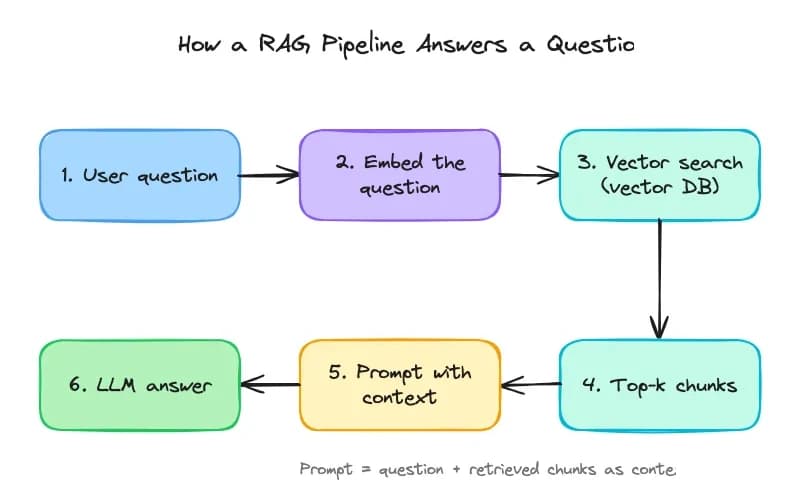
What the run tells you:
- Most of the tokens are the format guide. The guide stays in the conversation, so Claude reads it again at every later step. That is our reading of why a six-box diagram took 53,557 input tokens. On a Claude plan you pay no per-token price, but it counts toward your usage limits.
- The export and checkpoint tools are meant for the diagram view. The server marks them app-only, so an app that shows the view runs them when you click. The API shows no view, and there Claude could still call the export itself.
- We didn't test the view inside the Claude app. This run went through the API, so the draw-on animation and fullscreen editing aren't part of it.
We also listed both servers' tools ourselves with plain MCP requests, without signing in. Excalidraw: read_me and create_view for Claude, plus export_to_excalidraw, save_checkpoint and read_checkpoint for the view. tldraw, at https://tldraw-mcp-app.tldraw.workers.dev/mcp: search and exec for Claude, plus four tools for its canvas. Neither asked for an account.
Prompts that draw better diagrams
- List the boxes and arrows. "User question → embed → vector search → top-k chunks → prompt → answer" gives a cleaner result than "draw RAG".
- Say the direction: left to right for a pipeline, top to bottom for a hierarchy.
- Change one thing at a time once the first draft is there, for example "add a cache between search and the model".
- Keep labels short, or ask for wide text boxes. In our run, Claude cut off its own title and footnote.
- Export before you leave. The official server keeps nothing, so a diagram you don't export is gone with the chat.
Excalidraw vs. tldraw vs. Miro MCP
| Excalidraw | tldraw | Miro | |
|---|---|---|---|
| Looks like | A hand-drawn sketch | Clean whiteboard shapes | Your Miro board: stickies, diagrams, docs, tables |
| Account | None | None: no sign-in when we connected | A Miro account, signed in with OAuth |
| Free limits | None stated | None stated | 100 tool calls a day on Miro Free |
| Where it draws | Inside the chat | Inside the chat | On the board, in Miro |
| Edits after the first draw | Claude sends the whole diagram again, after checking for your manual edits | Claude writes JavaScript against the tldraw editor, so it can change any single shape | Reads and updates board items and comments |
| Tools Claude sees | read_me, create_view | search, exec | Board, diagram, doc, table, comment and image tools |
| Saved where | Only when you export | Checkpoints in the chat | On your board |
| Best for | A quick explainer diagram | Sketching back and forth with Claude | Teams whose work already lives in Miro |
Sources: Claude's directory listings for each, tldraw's launch post and Miro's MCP help page. In Claude Code, Miro installs as a plugin with /plugin install miro@miro-ai.
FAQ
Can I connect Excalidraw to Claude?
Yes. Add the official Excalidraw connector from Claude’s connector directory under Customize › Connectors. It is free, needs no Excalidraw account and works in Claude on the web, the desktop app and the mobile apps. In Claude Code, add it with claude mcp add --transport http excalidraw https://mcp.excalidraw.com/mcp.
Is there an official MCP for Excalidraw?
Yes, two, both made by Excalidraw. The free Excalidraw MCP App draws new diagrams inside your chat. The Excalidraw+ MCP, in public beta, reads and edits the scenes in a paid Excalidraw+ workspace and needs an API key.
Is the Excalidraw MCP free?
The official Excalidraw MCP App is free and needs no account or key; Claude’s Free plan can use it. The Excalidraw+ MCP needs a paid Excalidraw+ workspace. The community mcp_excalidraw server is free and open source (MIT).
Does the Excalidraw MCP save my diagrams?
No. The official server draws the diagram in your chat and keeps nothing. Export it to excalidraw.com to get a shareable link you can open, edit and save: in the Claude app the diagram view does the export, and in Claude Code or the API you ask Claude for it.
Can I use the Excalidraw MCP in Claude Code?
Yes, but a terminal cannot show the drawing, so ask Claude to export it to excalidraw.com and open the link. For a canvas you can watch while Claude draws, use the community mcp_excalidraw server, which opens one in your browser.
Is there a canvas MCP for Claude?
Yes. Excalidraw and tldraw both have official connectors in Claude’s directory that draw on a canvas inside the chat, and Miro’s connector writes to your Miro boards. For a local canvas that Claude Code can drive, there is the community mcp_excalidraw server.
Is the Miro MCP free?
It works on every Miro plan, with a daily limit on tool calls: 100 on Free, 500 on Starter, 2,000 on Business and 10,000 on Enterprise. The limit resets at 00:00 UTC, and Enterprise admins must approve the server first.
Who wrote this
We make Creatos, a desktop canvas where you put PDFs, YouTube videos and notes next to several AI models and compare their answers. See a research canvas or our model tests.