
Guide · checked on
draw.io MCP in Claude and Claude Code: setup, tools and limits
draw.io's official MCP server lets Claude make draw.io diagrams inside the chat, where you can zoom in, open them in the draw.io editor or download the .drawio file. You add one address, https://mcp.draw.io/mcp, and there is no account to create. Claude Code can use the same address, but a terminal can't show the diagram, so draw.io also makes a Claude Code plugin that saves .drawio files in your project. This guide covers the setup for both, what each tool does, what you need on each side, the limits, what came back when we ran it in Claude Code, and how the official server compares with the community drawio-mcp-server.
Short answer
- Claude on the web or desktop: Customize › Connectors, find draw.io in the directory and connect it, or add
https://mcp.draw.io/mcpas a custom connector. No sign-in, on any Claude plan. - Claude Code, for files: install draw.io's plugin with
/plugin marketplace add jgraph/drawio-mcpand/plugin install drawio@drawio. PNG, SVG and PDF exports need draw.io Desktop. - Claude Code, for a link:
claude mcp add --transport http drawio https://mcp.draw.io/mcp. draw.io says the server then answers with a link that opens the diagram in the draw.io editor. - Diagrams already on your disk: draw.io's local tool server,
@drawio/mcp, reads and replaces single pages of a .drawio file. The community drawio-mcp-server edits shapes one by one in a local editor.
Watch draw.io against two other mind map connectors
Which draw.io MCP do you need?
| Hosted server | Claude Code plugin | Tool server (@drawio/mcp) | drawio-mcp-server (lgazo) | |
|---|---|---|---|---|
| Made by | draw.io, Apache 2.0 licence | draw.io | draw.io | Community (Ladislav Gazo), MIT licence |
| Runs where | draw.io’s server; you add a URL | A skill in Claude Code, which also adds the hosted server | Your computer (Node.js) | Your computer (Node.js 22 or later) |
| Account | None | None | None | None |
| Where the diagram appears | A viewer inside the chat; a link in a terminal | .drawio files, PNG, SVG or PDF exports, or an app.diagrams.net link | A new draw.io editor tab in your browser | A draw.io editor at localhost:3000, or draw.io in your browser through an extension |
| Tools | 3: create_diagram, search_shapes, get_drawio_reference | The drawio skill, plus the hosted server’s 3 tools | 8, including list_pages, get_page and set_page for local files | 30, listed in its TOOLS.md |
| Best for | Claude on the web or desktop | Claude Code, with diagrams kept in your repository | Claude Desktop or Claude Code, when you want the full editor | Changing a diagram that is open in draw.io, shape by shape |
draw.io's docs page lists two more options: a self-hosted copy of the hosted server, run with Docker, Node.js or Cloudflare Workers, and project instructions for a Claude Project, which have Claude build a draw.io link with Python and need no MCP at all. That makes five options on the docs page. The repository's README counts four, because it treats self-hosting as part of the hosted server.
The official options come from those two pages and the server's source. The community server is described from its README; we did not run it. On 22 October 2026, GitHub showed about 5,500 stars for jgraph/drawio-mcp and about 1,500 for lgazo/drawio-mcp-server.
What the official server’s tools do
We read the hosted server's source on 22 October 2026, at version 1.4.1. It gives Claude three tools:
create_diagramtakes draw.io XML or Mermaid code, one or the other, and shows it as an interactive diagram. Its description tells Claude to use XML for diagrams of boxes and lines up to about 30 shapes, and Mermaid for sequence diagrams, Gantt charts, the other Mermaid-only types and bigger flowcharts. Two optional passes tidy the layout:postLayout: "elk"rearranges the shapes, androuting: "libavoid", for XML only, leaves them where Claude put them and reroutes the connectors around them.search_shapessearches about 10,000 shapes in draw.io's libraries, among them AWS, Azure, Google Cloud, Cisco, Kubernetes, P&ID and electrical, and returns the exact style string to put in the XML. When the libraries have no good match, it also asks draw.io's icon service for brand logos and general icons. Its description tells Claude to skip it for flowcharts, UML, ER diagrams, org charts and mind maps.get_drawio_referencereturns draw.io's guide to writing XML or Mermaid. Claude is told to call it once per format before its first diagram in a conversation. The server's README says this text used to sit in create_diagram's description, which made that description about 55,000 characters long.
None of the three opens or saves a file. To change a diagram, you ask in the same chat. draw.io's page on changes says the viewer passes the diagram back to Claude as it is shown, and Claude "changes what you asked for, keeps everything else (positions, text, colours)" and shows the new version below the old one. By draw.io's timing, a change takes 25 to 45 seconds.
The viewer has zoom, Fit, Fullscreen, Expand for tall diagrams, and a Layout button that switches a Mermaid flowchart to an automatic layered layout. Open in draw.io opens the diagram in the full editor, where you can edit, save or export it. Copy puts the draw.io XML on your clipboard, and Download saves a .drawio file "in apps that allow downloads". In Claude, the shapes appear one by one as Claude writes them.
Set it up in Claude (web and desktop)
- Open Customize › Connectors in Claude and click + next to Connectors to browse the directory.
- Search for draw.io and connect it. There is nothing to sign in to.
- In a new chat, open + in the lower left, then Connectors, and check that draw.io is on.
- Ask for a diagram, for example "Draw a flowchart of a customer refund: request, check the order, approve or reject, refund, tell the customer."
draw.io's setup page gives the same route: "Open draw.io in the Claude connectors directory and connect it." If you don't find it there, add it by hand as a custom connector, below.
Anthropic's help centre says web connectors are available for all users in Claude, Claude Desktop and the mobile apps, and that a service you connect on the web or desktop is there the next time you log in on iOS or Android. draw.io's pages name Claude.ai as a host that shows the diagram, and don't mention the mobile apps. On a Team or Enterprise plan, an Owner or Primary Owner adds the connector for the organization first, and then each person connects it.
To add the server by hand as a custom connector: in Customize › Connectors, choose Add, then Custom › Web, name it draw.io, paste https://mcp.draw.io/mcp and choose No sign in. Anthropic's two pages name the button differently: the connectors page says Add, then Custom › Web, and the Pro and Max steps on the custom connector page say + Add, then Add custom connector. Free users can have one custom connector, so on Free the directory listing saves your one slot.
Claude Desktop can also run draw.io's tool server on your computer, which opens each diagram in the draw.io editor in your browser instead of the chat. Its README gives this entry for claude_desktop_config.json:
{
  "mcpServers": {
    "drawio": {
      "command": "npx",
      "args": ["@drawio/mcp"]
    }
  }
}
Anthropic says local servers in that file are separate from connectors and aren't available in claude.ai.
Set it up in Claude Code
Claude Code needs a Pro, Max, Team, Enterprise or Console account; Anthropic's setup page says the free claude.ai plan doesn't include it. draw.io documents three ways in.
The plugin, for files. This is the route draw.io's docs page gives for Claude Code. Inside Claude Code, add the marketplace and install it:
/plugin marketplace add jgraph/drawio-mcp
/plugin install drawio@drawio
Then ask for a diagram. By default the plugin's skill writes a .drawio file and opens it. Add png, svg or pdf to your request to export it, with the diagram embedded so the file still opens for editing in draw.io, or url to open it at app.diagrams.net and keep the .drawio file. Exports and Mermaid conversion need draw.io Desktop. Without it, the skill writes draw.io XML. To call it by name, type /drawio:drawio followed by your request.
draw.io's docs page says the plugins need "No MCP setup", which is true of the install. The plugin's README adds that since version 1.2.3 it also brings the hosted server into Claude Code, that in the terminal the skill keeps writing files, and that diagrams drawn with the hosted server are sent to mcp.draw.io. To keep everything on your machine, turn the plugin's drawio server off in /mcp.
The hosted server, for a link. Add it over HTTP, then run /mcp to check that it connected:
claude mcp add --transport http drawio https://mcp.draw.io/mcp
Neither of draw.io's own pages gives this command: the docs page lists the plugin for Claude Code, and the setup page lists the plugin's options and the tool server. The MCP App Server README covers this route: "In other hosts, such as Claude Code, the server answers with a link that opens the diagram in draw.io." If Claude Code is signed in with your claude.ai account and you already connected draw.io there, the connector shows up in /mcp by itself. Anthropic's MCP docs say a server you add in Claude Code takes precedence over a claude.ai connector with the same URL, and /mcp then lists the connector as hidden.
The tool server, for the full editor. draw.io's setup page gives this command for opening diagrams in the editor. It needs Node.js:
claude mcp add drawio -- npx -y @drawio/mcp
Each diagram opens in a new draw.io editor tab in your browser, from XML, CSV or Mermaid. It is the only official option that works on files you already have: list_pages, get_page and set_page read and replace one page of a local .drawio file and leave the others alone. The diagram travels in the part of the link after the #, which browsers don't send to the server. If you also added the hosted server as drawio, give this one another name.
Other apps draw.io documents
| App | How to add it | What you see |
|---|---|---|
| ChatGPT | Plugins › + › Add custom MCP server, with the hosted URL and no authentication, then Create as a plugin. In a chat, type @ and pick draw.io. | The diagram in the chat. draw.io says it isn’t in ChatGPT’s plugin directory yet. |
| VS Code with GitHub Copilot | The hosted URL as an "http" server in .vscode/mcp.json, then Start, and Copilot Chat in Agent mode | The diagram in the chat, from VS Code 1.109 |
| Cursor | The hosted URL in ~/.cursor/mcp.json, the one-click link in draw.io’s README, or the draw.io plugin from the Cursor Marketplace | The diagram in the Agent chat, from Cursor 2.6 |
| GitHub Copilot CLI | copilot mcp add --transport http drawio https://mcp.draw.io/mcp, or draw.io’s plugin for files | A link that opens the diagram in draw.io |
| Codex CLI | codex plugin marketplace add jgraph/drawio-mcp, then codex plugin add drawio@drawio | .drawio files and exports |
| OpenCode | The hosted URL under "mcp" in opencode.json, as a remote server | A link: OpenCode has no MCP Apps view |
From the MCP App Server README and draw.io's setup page. Antigravity gets the plugin too, with agy plugin install https://github.com/jgraph/drawio-mcp/tree/main/plugins/antigravity.
What it costs and what you need
- On draw.io's side: no account and no sign-in. draw.io's MCP pages give no price, quota or rate limit for the hosted server, and the code is open source under the Apache 2.0 licence. You need draw.io Desktop only for the plugin's exports, Mermaid conversion and automatic layout, and Node.js only for the tool server.
- On Claude's side: connectors work on every plan, Free included, and Free allows one custom connector. Claude Code needs a paid plan or a Console account.
- Tokens: "The model of your assistant writes the diagram as text," as draw.io's setup page puts it. Its prompts page measured about 1,500 output tokens for a Mermaid diagram and about 7,500 for one in draw.io XML.
- Privacy: the hosted server receives the diagram Claude wrote, shape search keywords and which guide Claude asked for. draw.io's privacy policy for AI assistants (v1.1, 13 October 2026) says "It never receives your conversation", that it processes diagrams in memory and doesn't store them, and that it "keeps no request logs". Searches that reach the icon service are kept longer: results for up to 30 days in a cache, usage statistics for three months and request logs for 7 days.
- Keeping it on your network: self-host the server with
docker run --rm -p 127.0.0.1:3001:3001 jgraph/drawio-mcp. Claude reaches custom connectors from Anthropic's cloud, so for Claude on the web or desktop a self-hosted server needs a public HTTPS address, for example through a tunnel.
Limits
- The diagram shows in the chat only where the app supports MCP Apps: Claude on the web, ChatGPT, VS Code 1.109 or later and Cursor 2.6 or later, by draw.io's list. Claude Code, Copilot CLI and OpenCode get a link.
- draw.io XML suits diagrams of up to about 30 shapes. Above that, ask for Mermaid, which lays itself out but takes only colours by role and no draw.io library icons.
- XML takes longer. By draw.io's timing, a Mermaid diagram takes 10 to 20 seconds and an XML one 35 to 60. In its example, a 20-step insurance claim process took 4 to 7 minutes as XML and 15 seconds when the prompt ended with "Use Mermaid."
- The hosted server can't open, read or save your files, and draw.io keeps no copy. Use Download or Open in draw.io to keep the diagram.
- Icons come only from draw.io's libraries and icon service. draw.io says images from other websites don't show in the chat.
Official server vs drawio-mcp-server (community)
drawio-mcp-server, by Ladislav Gazo, is a separate project. It runs on your computer and drives a live draw.io editor: a built-in one at http://localhost:3000, or draw.io in your browser through its Chrome or Firefox extension. Its 30 tools add, edit and delete single shapes and edges, manage pages and layers, import Mermaid, and export XML, SVG or PNG with the diagram embedded.
| Official hosted server | drawio-mcp-server | |
|---|---|---|
| How Claude draws | Sends a whole diagram as XML or Mermaid | Calls a tool for each shape, edge, page or layer |
| Changing a diagram | Claude sends a new version; the viewer passes the current one back | Changes one cell by its id, with edit-cell or delete-cell-by-id |
| Reads a diagram you already have | No | Yes, the one open in the editor (list-paged-model, get-selected-cell) |
| Claude on the web | Yes, from the directory | No: it runs on your computer. Claude Desktop can run it locally. |
| Claude Code | claude mcp add, or draw.io’s plugin | Its own plugin, or npx drawio-mcp-server install claude-code |
| You need | Nothing to install | Node.js 22 or later, and the editor page open |
| Licence | Apache 2.0 | MIT |
Both projects ship a Claude Code plugin called drawio. The official one installs as drawio@drawio. The community one installs from /plugin marketplace add lgazo/drawio-mcp-server. Its plugin README gives /plugin install drawio@drawio-mcp-server, and its main README shortens that to /plugin install drawio. Use the full name, and check /mcp to see which drawio server is on.
Pick the official server for diagrams in Claude's chat or files from Claude Code. Pick the community one when you want Claude to change a diagram that is open in draw.io, one shape at a time, while you watch.
What happened when we ran it
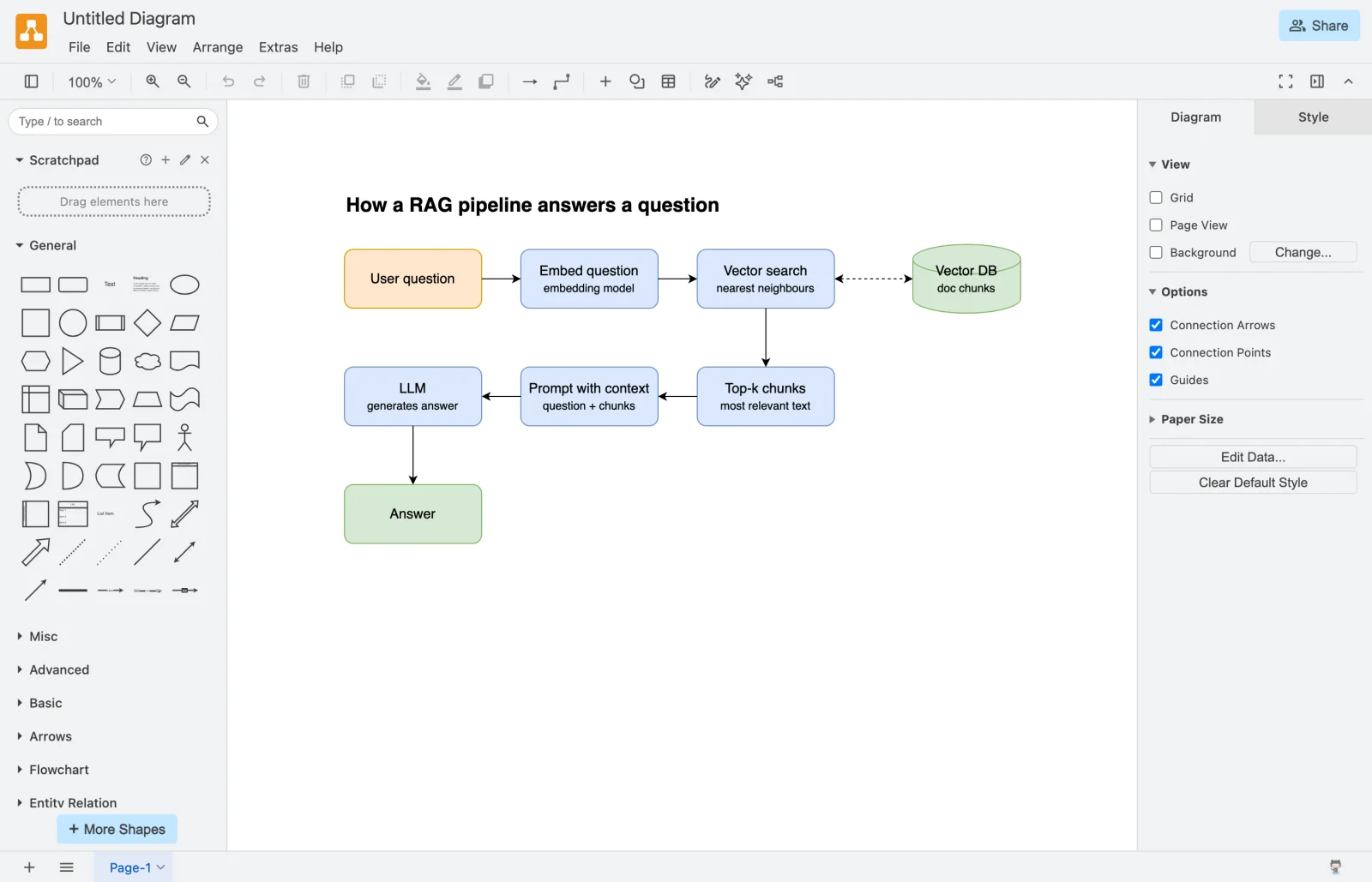
On 22 October 2026 we ran the hosted server in Claude Code 2.1.114, in a terminal on a Mac. We added https://mcp.draw.io/mcp in an MCP config file in the project and started Claude Code with --strict-mcp-config, so it loaded no other MCP server. There was nothing to sign in to and nothing to install. We turned off Claude Code's own tools (Bash, Write, Edit, Read, Glob, Grep, WebFetch, WebSearch and Task), so draw.io was the only thing that could act. The prompt is the one from our Excalidraw and tldraw tests, word for word, including the last sentence, which asks for something draw.io doesn't do:
Draw a diagram of how a RAG pipeline answers a question: user question, embed the question, vector search, top-k chunks, prompt with context, LLM answer. Then export it to excalidraw.com and give me the link.
The server offered its three tools: create_diagram, get_drawio_reference and search_shapes. Claude first used Claude Code's tool search to load them, then called two of them:
get_drawio_referencewith the format set to XML. It returned draw.io's XML guide, 47,312 characters long.create_diagramwith Claude's XML. The answer was 5,785 characters: the diagram's XML and an app.diagrams.net link. The whole diagram is compressed into the part of the link after the#, which was 1,191 characters.
It didn't call search_shapes, which the tool's description says to skip for flowcharts.
| Measured | Result |
|---|---|
| Time, start to finish | 44.3 seconds (43.3 from prompt to answer) |
| Turns | 4 |
| Input tokens | 12 new, 54,029 written to the prompt cache, 50,688 read from it |
| Output tokens | 4,984 |
| Cost, as Claude Code reported it | $0.49 |
The input numbers include Claude Code's own system prompt. Our Excalidraw and tldraw runs sent the same prompt through the Claude API instead, so compare their drawings with this one but not their token counts.
The terminal showed only the link, since a terminal can't show draw.io's viewer. Claude then said it couldn't export to excalidraw.com and offered an SVG export or a Mermaid version instead. Opening the link showed the diagram in the draw.io editor:
What the run tells you:
- In Claude Code you get a link, as draw.io says. Open it to see and edit the diagram, and save it from the editor. For .drawio files in your project, use draw.io's plugin.
- The link holds the diagram. Anyone you send it to can open the whole diagram, so share it the way you would share the file.
- Turn off the tools you don't want used. In our first try we had left Claude Code's shell on. After drawing with draw.io, Claude wrote its own script and put the diagram on a public excalidraw.com share link, to answer the prompt's last sentence. If you want only draw.io to act, turn the other tools off, for example with
--disallowedToolsonclaude -p, or approve each tool call yourself. - We didn't test the viewer inside the Claude app. This run was in a terminal, so the in-chat viewer and its buttons aren't part of it.
When it fails, and what to do
| What you see | What to do |
|---|---|
| Claude answers with text, Mermaid code or an artifact instead of a draw.io diagram | Check that draw.io is on for this chat, under + › Connectors, and say “use draw.io” in the prompt. draw.io’s tool server README suggests naming the tool or adding the instruction “Always use the draw.io MCP tools to create diagrams.” |
| A link or a block of JSON, and no diagram | The app can’t show MCP Apps. In Claude Code, Copilot CLI and OpenCode that is expected: open the link, or use the plugin for files. In VS Code, update to 1.109 or later; in Cursor, to 2.6 or later. |
| The plugin writes a .drawio file but no PNG, SVG or PDF | Install draw.io Desktop. Without it, draw.io says the plugin keeps the .drawio file and sends nothing anywhere else. |
| The plugin still behaves like an older version | Claude Code keeps the version you installed. Run claude plugin marketplace update drawio, then claude plugin update drawio@drawio, and restart Claude Code. |
| /mcp lists the claude.ai draw.io connector as hidden | You also added the same URL in Claude Code, and that one wins. Remove one of the two if you want the other. |
| Claude Free won’t let you add the custom connector | Free allows one custom connector. Connect draw.io from the directory instead, or remove the other custom connector. |
| draw.io isn’t offered on a company Claude account | On Team and Enterprise, an Owner or Primary Owner has to add it for the organization first. |
| A self-hosted server won’t connect in Claude | Claude connects from Anthropic’s cloud, so a localhost address can’t work. Give it a public HTTPS address, for example with npx cloudflared tunnel --url http://localhost:3001, and add the tunnel URL with /mcp at the end. |
| A big diagram is slow or comes out messy | Ask for Mermaid, or ask for one specific change, such as a left-to-right layout. For many small fixes, open it in draw.io and edit by hand. |
| The viewer shows missing connectors, a broken layout, or never finishes | draw.io asks you to open a GitHub issue with a screenshot and your prompt. |
Sources: draw.io's docs page, viewer page and prompts page, the MCP App Server, tool server and plugin READMEs, and Anthropic's custom connector page, Claude Code MCP docs and plugin docs.
draw.io vs Excalidraw, tldraw and Miro
draw.io's server is the one to pick for technical diagrams that need a shape library, such as cloud architecture or network diagrams. For a quick hand-drawn sketch with a link to share, see our Excalidraw MCP guide; for a canvas Claude edits shape by shape inside the chat, the tldraw MCP guide; and for diagrams that have to land on your team's boards, the Miro MCP guide. Our Excalidraw vs tldraw vs Miro comparison puts those three side by side, and the list of whiteboard and diagram MCP servers has the address, sign-in and cost for the rest.
Where Creatos fits
It doesn't, for diagrams. We make Creatos, a desktop canvas where one source, such as a PDF or a YouTube video, connects to several AI models so you can read their answers side by side. It has no MCP server today, so Claude can't draw on it. It uses your own API keys or local models through Ollama and runs on macOS and Windows. A new download gets a 7-day free trial. After that, the lifetime license is $69 once until 18 November 2026, then $99.
FAQ
Is there an official draw.io MCP server?
Yes. draw.io runs one at https://mcp.draw.io/mcp, built from its open-source jgraph/drawio-mcp repository. draw.io says it is listed in Claude’s connector directory, and it also works in ChatGPT, VS Code with GitHub Copilot and Cursor. The same repository has a Claude Code plugin and a local tool server, @drawio/mcp.
Is the draw.io MCP free?
draw.io asks for no account or sign-in and publishes no price or usage limit for the hosted server, and the code is open source under the Apache 2.0 licence. On the Claude side, connectors work on every plan, Free included, but Free allows only one custom connector, and Claude Code needs a paid plan or a Console account.
How do I add draw.io to Claude?
In Claude on the web or the desktop app, open Customize › Connectors, find draw.io in the directory and connect it. There is nothing to sign in to. To add it by hand, add a custom connector with the URL https://mcp.draw.io/mcp and choose No sign in. Then check that draw.io is on for the chat, under + › Connectors, and ask for a diagram.
Does the draw.io MCP work in Claude Code?
Yes. draw.io’s plugin, installed with /plugin marketplace add jgraph/drawio-mcp and then /plugin install drawio@drawio, writes .drawio files, and with draw.io Desktop installed it exports PNG, SVG or PDF. You can also add the hosted server with claude mcp add --transport http drawio https://mcp.draw.io/mcp. draw.io says that in Claude Code it answers with a link that opens the diagram in draw.io, because a terminal can’t show the viewer. That is what we got when we ran it.
What tools does the draw.io MCP server have?
The hosted server has three. create_diagram draws draw.io XML or Mermaid as an interactive diagram. search_shapes finds the exact style for about 10,000 draw.io shapes, such as AWS, Azure and Cisco icons. get_drawio_reference returns draw.io’s guide to writing XML or Mermaid. The local @drawio/mcp tool server has eight tools, including three that read and replace pages of .drawio files.
Can Claude edit my existing .drawio files?
Not through the hosted server, which only draws what Claude sends it and keeps nothing. The local @drawio/mcp tool server can: list_pages, get_page and set_page read and replace one page of a .drawio file on your computer and leave the other pages alone. The community drawio-mcp-server edits single shapes in a diagram that is open in its local editor.
What is the difference between drawio-mcp and drawio-mcp-server?
jgraph/drawio-mcp is draw.io’s own repository: the hosted server, the plugins and the @drawio/mcp tool server. lgazo/drawio-mcp-server is a community project under the MIT licence. It runs on your computer and drives a live draw.io editor with 30 tools for single shapes, edges, pages and layers. It needs Node.js 22 or later and can’t be used in Claude on the web.
Who wrote this
We make Creatos, so read this with that in mind. The facts about draw.io come from its docs, setup page and privacy policy, the jgraph/drawio-mcp READMEs and the server's source. The facts about Claude come from Anthropic's help centre and Claude Code docs. The community server is described from its README and tools list. We read all of them on 22 October 2026, the day we ran the hosted server in Claude Code for the test above.