
Comparison · checked on
Excalidraw vs tldraw vs Miro: the apps, their MCP servers, and the two we ran in Claude
Excalidraw and tldraw are free whiteboards you can open in a browser without an account. Miro is a team workspace with a free plan and paid plans from $8 a member a month, billed yearly. All three makers now run an official MCP server that lets Claude draw. This page compares the apps first, then the servers, then the same prompt we ran with Excalidraw's and tldraw's servers. We did not run Miro's server: everything about it here comes from Miro's own docs.
Short answer: pick by job
- A quick diagram in a Claude chat, with a link: Excalidraw. Its MCP server is free, needs no account, and in our run it returned an excalidraw.com link.
- Sketching back and forth inside the Claude app: tldraw. Claude edits single shapes with code. Through the API, which shows no canvas view, our run got nothing back.
- The diagram has to land on your team's boards: Miro. You sign in, and tool calls are capped per day by plan, 100 on Free. We haven't run it ourselves.
- Just the app, no AI: Excalidraw for a free, open-source, hand-drawn sketch tool; tldraw for cleaner shapes, also free with no sign-up; Miro for a shared team workspace.
- A canvas inside your own product: Excalidraw's MIT-licensed package is free in production. tldraw's SDK needs a license key there.
Excalidraw vs tldraw vs Miro: the apps
| Excalidraw | tldraw | Miro | |
|---|---|---|---|
| Looks like | A hand-drawn sketch | Clean whiteboard shapes | Sticky notes, shapes, cards and frames on a team board |
| Open source | Yes, MIT licence. The excalidraw.com app’s code is in the same repository. | No. Source available under the tldraw license, which tldraw says “is not permissively licensed”. | No |
| Sign-in | None on excalidraw.com; it saves to your browser. Excalidraw+ needs an account. | None on tldraw.com. Log in to keep files in the cloud, synced between devices. | A Miro account |
| Price | excalidraw.com is free. Excalidraw+ is $6 per user a month billed yearly, $7 monthly, with a 14-day trial. | tldraw.com is free. | Free with 3 editable boards. Starter $8 and Business $20 per member a month, billed yearly. Enterprise priced on request, from 30 members. |
| Licence for your own app | The @excalidraw/excalidraw package, MIT, free in production. | The SDK is free in development only. Production needs a license key: a 100-day free trial, a commercial license, or a free hobby license for non-commercial projects, which tldraw grants at its discretion and which shows a “made with tldraw” watermark. No prices are published. | Not compared here |
| Working together | Real-time collaboration, end-to-end encrypted. Excalidraw+ adds access control, comments, voice and screen sharing. | Real-time. Invite editors or viewers with a link; guests don’t need to log in. | On Free, every board is open to the whole team, with no guests. Starter adds public edit links, Business signed-in guests. |
Sources, read on 21 October 2026: the Excalidraw repository and the Excalidraw+ pricing page; tldraw's license page, pricing page, its description of tldraw.com and its post on accounts and sharing; and Miro's pricing. tldraw's pricing page sells SDK licenses through a trial or its sales team and shows no price. The tldraw repository calls its real-time multiplayer sync "the same stack behind tldraw.com".
Their MCP servers in Claude
| Excalidraw | tldraw | Miro | |
|---|---|---|---|
| Address | https://mcp.excalidraw.com in the README; we connected to https://mcp.excalidraw.com/mcp | https://tldraw-mcp-app.tldraw.workers.dev/mcp | https://mcp.miro.com/ |
| Works in | Clients that show MCP Apps: Claude, ChatGPT, VS Code, Goose and others | Claude and Cursor; ChatGPT and Codex through tldraw’s plugin | Claude, Claude Code, Cursor, VS Code, ChatGPT, Codex, Gemini CLI and more |
| Sign-in | None | None when we connected | Your Miro account, through OAuth, one team at a time |
| Where it draws | A view inside the chat | A canvas view inside the chat | On your Miro board |
| Create | Yes: create_view draws a new diagram | Yes: exec runs JavaScript on the canvas | Yes: canvas_create_from_svg, and board_create for a new board |
| Edit it | Claude sends the whole diagram again, after checking for your manual edits | Claude changes any single shape with code | canvas_update_from_svg applies an SVG diff that creates, updates and deletes items |
| Read it back | Only the diagram in this chat. None of its 5 tools opens an existing drawing; the paid Excalidraw+ MCP does. | The canvas in this chat, through the view. In our API run, the read-back got no shapes. | Yes: canvas_read_as_svg reads existing boards and frames, and board_search_boards finds them |
| Saved where | Nowhere, until you export it to excalidraw.com | Checkpoints on tldraw’s server: up to 50 a session, deleted after 7 days without a save | On your board |
| Limits | None stated | None stated | Tool calls a day: 100 on Free, 500 Starter, 2,000 Business, 10,000 Enterprise; reset at 00:00 UTC |
| Without the view (Claude Code, the API) | Worked in our API run: Claude exported the diagram and returned a link | In our run, nothing came back | The result lands on the board; Miro documents Claude Code, Cursor and others |
| Run by us | Yes, 6 October 2026 | Yes, 7 October 2026 | No |
All three are in Claude's connector directory: in Claude on the web or the desktop app, open Customize › Connectors, search for the name and connect it; Miro then asks you to sign in. Setup for each app is in our Excalidraw MCP guide, tldraw MCP guide and Miro MCP guide.
Sources: the Excalidraw MCP README and Excalidraw+ MCP docs, the tldraw MCP README and tldraw's post on Claude, and Miro's MCP intro, tools page and limits page, all read on 21 October 2026, plus the tools we listed ourselves for Excalidraw and tldraw in October. Excalidraw's README now prints https://mcp.excalidraw.com without the /mcp path we used. Claude's directory listings for tldraw and Miro still show tools that both servers have since replaced.
Excalidraw MCP vs tldraw MCP: the same prompt
Our Excalidraw and tldraw guides each report one run of the same prompt, sent to Claude Sonnet 5.5 through the Claude API on 6 and 7 October 2026. The prompt ends by asking for an excalidraw.com link, which tldraw can't make. We kept it word for word so the two runs match:
Draw a diagram of how a RAG pipeline answers a question: user question, embed the question, vector search, top-k chunks, prompt with context, LLM answer. Then export it to excalidraw.com and give me the link.
| Excalidraw | tldraw | |
|---|---|---|
| Date | 6 October 2026 | 7 October 2026 |
| Tools Claude called | read_me, create_view (14 elements), export_to_excalidraw | search, exec, then exec again to check the layout |
| Time, prompt to answer | 49.5 seconds | 50.0 seconds |
| Input tokens | 53,557, most of it the 26,943-character format guide | 20,144 |
| Output tokens | 8,509, of which 1,432 thinking | 1,784, of which 400 thinking |
| Cost at API prices ($2 / $10 per million) | About $0.19 | About $0.06 |
| What came back | An excalidraw.com link to the diagram | Nothing to see: the server replied that the canvas “is rendering”. Claude said it couldn’t make an excalidraw.com link and hadn’t seen the result. |
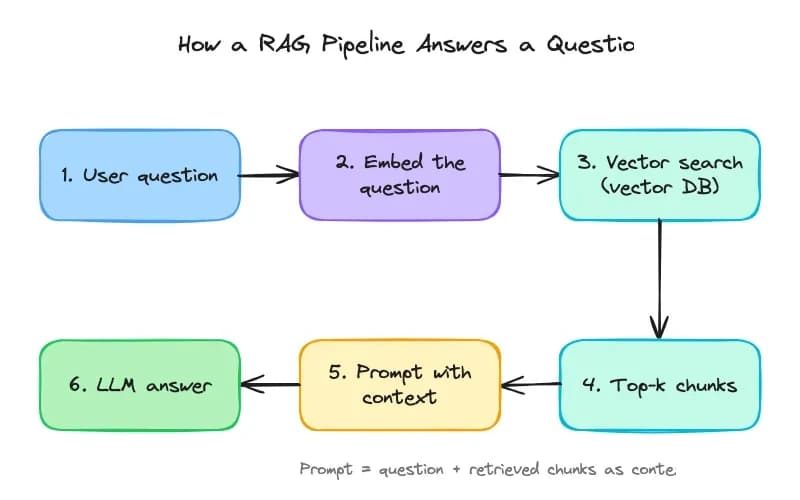
What the two runs tell you:
- Only Excalidraw works without the view. Its export tool gave Claude a link to hand back. tldraw's drawing comes back through tools that only its canvas view calls, so through the API there was no drawing, no link and nothing to screenshot.
- tldraw is lighter on tokens. Its
searchtool returns only the parts of the tldraw API Claude asks for. Excalidraw'sread_mereturns a full format guide that stays in the conversation, which is our reading of why a six-box diagram took 53,557 input tokens. - Neither run tested the view in the Claude app. The draw-on animation, fullscreen editing and tldraw's live canvas aren't part of these numbers.
Watch the side-by-side test
Miro: what its tools do (we didn't run it)
We did not run Miro's MCP server, so there are no Miro numbers on this page. This is how Miro's tools page, updated 17 September 2026, describes drawing on a board:
canvas_get_canvas_composer_skillgets "the SVG format specification for creating board layouts".canvas_create_from_svgcreates "multiple board items on a Miro board from SVG".canvas_read_as_svgreads items back as SVG: "Every item carries a stable data-miro-id."canvas_update_from_svgapplies "an SVG document as a diff. Creates, updates, and deletes."
The result is native items on a board you sign in to, not a view in the chat. Each of those is a separate tool call, and Miro's limits page says: "Every call your AI agent makes to a Miro MCP tool counts toward your daily allowance." The setup, the full tool list and the limits are in our Miro MCP guide.
Mermaid, draw.io and the others
If you'd rather keep a diagram as code, Mermaid Chart's official server checks and renders Mermaid and works with a free Basic account. draw.io's official server draws in the chat with no account, and FigJam, Lucid, Whimsical and Eraser have servers of their own. Our list of 47 whiteboard and diagram MCP servers has the address, sign-in and cost for each one.
Where Creatos fits
It isn't a diagram tool, so it isn't in the tables. We make Creatos, a desktop app with an infinite canvas where text, AI model, image and video nodes connect into a workflow. It helps with a different job: put one source on the canvas and read what Claude, GPT and Gemini make of it, side by side. A new download gets a 7-day free trial. After that, the lifetime license with your own API keys is $69 once until 18 November 2026, then $99. It runs on macOS and Windows.
FAQ
Is Excalidraw or tldraw better?
For a free, open-source sketch tool with a hand-drawn look and no sign-in, Excalidraw. For cleaner shapes, tldraw, which is also free on tldraw.com with no sign-up. In Claude, pick Excalidraw for a quick diagram with a link you can share, and tldraw for editing a sketch back and forth inside the Claude app. To build a canvas into your own product, Excalidraw’s package is MIT-licensed, while tldraw’s SDK needs a license key in production.
Is tldraw open source?
Not in the usual sense. tldraw says its SDK is source available but “not permissively licensed”. Under the tldraw license you can use it free in development. Production needs a license key: a free 100-day trial, a free hobby license, at tldraw’s discretion, for non-commercial projects that must show the “made with tldraw” watermark, or a commercial license from tldraw’s sales team. tldraw.com itself is free to use.
Is Excalidraw free?
Yes. excalidraw.com is free and open source under the MIT licence, needs no account and saves your drawing in your browser. Excalidraw+, the paid version with cloud storage, sharing controls and an MCP server in public beta, costs $6 per user a month billed yearly or $7 billed monthly, with a 14-day trial. The official Excalidraw MCP App for Claude is free and needs no account.
Which uses fewer tokens, the Excalidraw MCP or the tldraw MCP?
tldraw, in our runs. The same prompt through the Claude API took 20,144 input tokens and about $0.06 with tldraw, against 53,557 and about $0.19 with Excalidraw, most of it Excalidraw’s 26,943-character format guide. But only the Excalidraw run gave us something to look at, an excalidraw.com link. tldraw draws in a canvas view inside the chat, and through the API nothing came back.
Did you test the Miro MCP?
No. We ran the Excalidraw and tldraw servers ourselves, but not Miro’s. What this page says about Miro comes from Miro’s own docs: the server at https://mcp.miro.com/ needs a Miro sign-in, reads and writes boards as SVG, and allows 100 tool calls a day on Free, 500 on Starter, 2,000 on Business and 10,000 on Enterprise, reset at 00:00 UTC.
Which one works in Claude Code?
Excalidraw is the safe pick. A terminal can’t show the drawing, so ask Claude to export it to excalidraw.com and open the link. tldraw connects, but its canvas is a view a terminal can’t show, and in our API run nothing came back. Miro documents a Claude Code setup, and its server writes to your Miro board rather than to a view in the chat; we haven’t tried it.
Is there a Canvas MCP for Claude?
People who search for this often mean Canvas LMS, the learning platform, or Canva, the design app. This page covers neither, though Canva runs an official server at https://mcp.canva.com/mcp. For a drawing canvas, Excalidraw and tldraw both draw on one inside the Claude chat with no account, and Miro’s server draws on your Miro board. Our list of whiteboard and diagram MCP servers has the others.
Who wrote this
We make Creatos, so read this with that in mind. We ran the Excalidraw and tldraw servers ourselves on 6 and 7 October 2026, and the numbers above are copied from those runs as our guides published them. We did not run Miro's server. Every other fact comes from the makers' own pages: we re-read the ones linked here on 21 October 2026, and our guide to each tool links the rest.